Failover
|
This feature requires an enterprise license. To get a trial license key or extend your trial period, generate a new trial license key. To purchase a license, contact Redpanda Sales. If Redpanda has enterprise features enabled and it cannot find a valid license, restrictions apply. |
Failover is the process of modifying shadow topics or an entire shadow cluster from read-only replicas to fully writable resources, and ceasing replication from the source cluster. You can fail over individual topics for selective workload migration or fail over the entire cluster for comprehensive disaster recovery. This critical operation transforms your shadow resources into operational production assets, allowing you to redirect application traffic when the source cluster becomes unavailable.
You can failover a shadow link using Redpanda Console, rpk, or the Admin API.
On Kubernetes, the Redpanda Operator’s ShadowLink resource can’t start a failover. Run the rpk commands inside a Redpanda Pod. See Kubernetes Shadow Link Failover for details.
|
|
See Failover Runbook for immediate step-by-step disaster procedures. |
Plan for failover
Before running a failover, be sure you understand the following considerations, which affect your disaster recovery strategy and operational planning.
Data consistency:
-
Some data loss may occur due to replication lag at the time of failover.
-
Consumer group offsets are preserved, allowing applications to resume from their last committed position.
-
In-flight transactions at the source cluster are not replicated and will be lost.
Recovery-point-objective (RPO):
The amount of potential data loss depends on replication lag when disaster occurs. Monitor lag metrics to understand your effective RPO.
Testing requirements:
Regularly test failover procedures in non-production environments to validate your disaster recovery processes and measure your recovery time objective (RTO).
Choose a failover scope
What a failover does depends on its scope. In every scope, each topic that fails over stops fetching data from the source cluster and changes state from ACTIVE to FAILING_OVER, then to FAILED_OVER.
Topic failover is irreversible. Once failed over, topics cannot return to shadow mode, and automatic fallback to the original source cluster is not supported.
| To avoid a split-brain scenario after failover, ensure that all clients are reconfigured to point to the shadow cluster before resuming write activity. |
| Scope | Use it when | Shadow link after failover | Sync tasks after failover | Schema Registry after failover |
|---|---|---|---|---|
Whole link (no scope flag) |
The source cluster is down, and the shadow cluster becomes your production cluster. |
|
Stopped permanently ( |
Writable |
Every active topic ( |
The cluster doesn’t support whole-link failover, or you want topic data to fail over while the link keeps synchronizing metadata. |
|
Still running |
Still write-protected |
One topic ( |
You want to move specific workloads, or test your failover procedures. |
|
Still running |
Still write-protected |
Whole-link failover
Use whole-link failover when the source cluster becomes unavailable and you need to make the entire shadow cluster your new production environment. For example, a cloud region outage takes down every source broker, or the source cluster’s datacenter loses power or network connectivity.
A whole-link failover finishes every sync task before it fails over any topic. The sync tasks copy consumer group offsets, access control lists (ACLs), roles, topic properties, and schemas from the source cluster. Finishing them first means that if the source cluster comes back briefly during the failover, the tasks can’t overwrite changes that clients already made on the shadow cluster. For example, a stale consumer group offset copied over a newer one would make a consumer read the same data again.
Prerequisites
-
All brokers must be running Redpanda v26.3 or later.
-
You have installed and are using
rpkv26.3 or later, which supports whole-link failover. -
The shadow link is in the
ACTIVEstate. -
You must have superuser access to the Admin API. Starting the failover requires it, and so does pausing or resuming sync tasks with
rpk shadow task pauseorrpk shadow task resume. -
If the source cluster is still reachable, fence the source cluster before you fail over. This is the case for a planned cutover, a failover test, or a partial outage. Fencing keeps clients from writing to the source cluster after the failover, so the two clusters don’t diverge. If the source cluster is unreachable, you can’t fence it, so fail over without fencing.
Limitations
Be aware of the following limitations when working with whole-link failover:
-
You can start a whole-link failover only with
rpkor the Admin API. Redpanda Console and Redpanda Cloud don’t support it. -
On Kubernetes, the Redpanda Operator’s
ShadowLinkresource can’t start a whole-link failover. Runrpk shadow failoverinside a Redpanda Pod. See Kubernetes Shadow Link Failover. -
You can’t cancel a whole-link failover after it starts. Running the command again resumes a faulted failover and otherwise changes nothing.
-
Whole-link failover doesn’t fail over topics in the
FAULTEDstate. See Topic in FAULTED state after a whole-link failover.
How whole-link failover works
A whole-link failover makes the shadow cluster your primary cluster in a single operation. When you run rpk shadow failover <shadow-link-name> with only the link name, and neglect to specify the scope flag (--all or --topic), Redpanda fails over the whole link in two phases. First it shuts down the link’s metadata replication, and then it fails over the shadow topics. The link reports FAILING_OVER while both phases run.
As soon as the failover starts, Redpanda freezes the link configuration. You can’t update the link, add shadow topics, fail over individual topics, or pause or resume sync tasks. Because the link’s end state is final, the configuration stays frozen after the failover too.
In the first phase, Redpanda permanently stops the link’s five metadata sync tasks: topic, consumer group, security, role, and Schema Registry sync. Each task ends in the FINISHED state and never runs again. From this point, the shadow cluster no longer picks up metadata changes from the source cluster.
In the second phase, Redpanda fails over every ACTIVE and PAUSED shadow topic. Topics don’t wait for each other. Each topic accepts writes as soon as it reaches FAILED_OVER, even while other topics are still failing over. Until then, the shadow cluster rejects writes to that topic with a POLICY_VIOLATION error. Consumers can read it the whole time. For example, if orders finishes before payments, producers can write to orders while their writes to payments still fail. To avoid those errors, hold your producers until the link reports FAILED_OVER.
Schema Registry changes last. The Schema Registry contexts that the link protects stay write-protected until the whole link reaches FAILED_OVER. Until then, clients can’t register new schemas in them. The exception is when you paused the Schema Registry sync task before you started the failover. In that case, Schema Registry writes stay allowed throughout.
Shadow link states
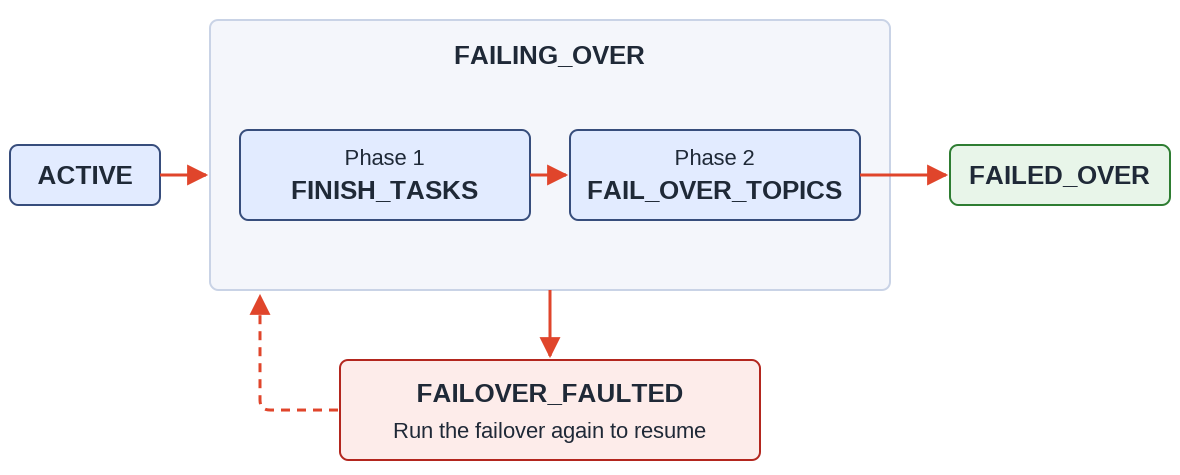
The link state tells you where a whole-link failover stands. A healthy link reports ACTIVE while it replicates data. When you start a whole-link failover, the link moves to FAILING_OVER and works through two phases in order. In the first phase, FINISH_TASKS, the link finishes every sync task. In the second phase, FAIL_OVER_TOPICS, it fails over the shadow topics. While the link is FAILING_OVER, it reports the phase it’s working on, for example FINISH_TASKS (1/2) or FAIL_OVER_TOPICS (2/2). Failover phases describes what each phase does. When both phases finish, the link reaches FAILED_OVER. That state is final. The configuration stays frozen, every sync task is FINISHED, and both the shadow topics and the protected Schema Registry contexts accept writes.
If a phase doesn’t finish before its deadline, the link moves to FAILOVER_FAULTED and stays in the phase where it stopped. The configuration stays frozen, and Schema Registry write protection stays in place. A faulted failover never resumes on its own. Fix the blocker that the fault reason names, then run the failover command again. The failover resumes from the phase where it stopped, not from the beginning.
Only a whole-link failover changes the link state. A failover of individual topics (--all or --topic) leaves the link ACTIVE, and its sync tasks keep running.
Figure 1 shows shadow link states during the progression of a whole-link failover workflow. The arrows show the path a failover takes: from ACTIVE, through the two FAILING_OVER phases, to FAILED_OVER. If either phase misses its deadline, the link moves to FAILOVER_FAULTED. When you run the failover again, the link returns to the phase where it stopped.
Failover phases
A whole-link failover runs in two phases. Each phase has its own deadline, set by the shadow_link_failover_timeout cluster property (default: 5 minutes). The deadline is measured from the start of the phase, and progress inside a phase does not extend it. When you resume a faulted failover, the phase gets a new deadline. A controller leader change or a broker restart doesn’t reset the deadline. The failover continues from the phase it was in, and sync tasks that finished don’t start again.
| Phase | rpk shadow status output |
What the phase waits for |
|---|---|---|
|
|
Every instance of every sync task on every broker reports |
|
|
Every |
There is no separate Schema Registry phase. The link lifts Schema Registry write protection when it reaches FAILED_OVER.
In the Admin API, the link reports failover progress in the cutover field of its status (status.cutover.phase and status.cutover.phase_started_at), and the fault reason in status.status_reason. The cutover field is unset after the link reaches FAILED_OVER.
When a phase misses its deadline, the fault reason has the form <phase>: not complete after <timeout>; <detail>. The detail names up to five blockers. It takes one of these forms:
-
brokers 2, 3 did not report their tasks: One or more brokers did not answer. -
<n> of <m> task instances not finished: <task> on node <id> shard <s> (<state>), …: Every broker answered, but at least one task instance has not finished. -
1 of 200 mirror topics not terminal: orders (failing_over): At least one shadow topic has not reached a final state.
For how to resolve a fault, see Shadow link in FAILOVER_FAULTED state.
Run a whole-link failover
To fail over the whole shadow link, run:
rpk shadow failover <shadow-link-name>Without a scope flag, the command fails over the shadow link itself, as described in How whole-link failover works.
rpk checks the broker versions before it prompts you to confirm, and refuses if it can’t confirm that every broker runs 26.3 or later. On an older cluster, or while an upgrade to 26.3 is in progress or not yet finalized, use --all instead. See Failover during and after an upgrade to 26.3.
If rpk refuses because a broker does not answer the Admin API, it can’t read that broker’s version. Retry after the broker answers again, or, if the broker is down during a disaster, start the failover through the Admin API. Send the request to a broker that runs 26.3 or later:
curl -X POST http://<broker-address>:9644/redpanda.core.admin.v2.ShadowLinkService/FailOver \
  -H 'Content-Type: application/json' \
  -d '{"name": "<shadow-link-name>", "failOverLink": true}'
The failOverLink and shadowTopicName fields are mutually exclusive. The request returns as soon as the failover starts. A 26.3 broker refuses the request with FAILED_PRECONDITION until every broker runs 26.3 or later. A broker that runs an earlier version ignores failOverLink and fails over every active topic one by one instead, so send the request only to a broker that runs 26.3 or later.
Monitor a whole-link failover
To follow a whole-link failover until it finishes, run the command with --wait. To check its progress at any time, use rpk shadow status.
Wait for the failover to complete
By default, the command returns as soon as the failover is requested. To block until the link reaches FAILED_OVER, add --wait:
rpk shadow failover <shadow-link-name> --waitWith --wait, the command reports the state and phase as the failover progresses, for example STATE FAILING_OVER, PHASE FINISH_TASKS (1/2). When the output shows on screen, the command updates a single line with a spinner. When you redirect the output to a file or pipe it to another command, it prints a new line each time the state or phase changes, so a log keeps every step. When the failover completes, the command prints Shadow Link "<shadow-link-name>" failed over. and exits with code 0.
The confirmation prompt requires your response. If using scripts, add --no-confirm:
rpk shadow failover <shadow-link-name> --wait --no-confirmFor example, a script that runs this command on a link that fails over with no problems logs these lines:
STATE FAILING_OVER, PHASE FINISH_TASKS (1/2)
STATE FAILING_OVER, PHASE FAIL_OVER_TOPICS (2/2)
STATE FAILED_OVER
Shadow Link "<shadow-link-name>" failed over.
If the first phase misses its deadline, the script logs these lines instead, followed by the failover faulted error:
STATE FAILING_OVER, PHASE FINISH_TASKS (1/2)
STATE FAILOVER_FAULTED, PHASE FINISH_TASKS (1/2)
The command exits with code 0 only when the link reaches FAILED_OVER. Any other result exits with code 1, which means the link didn’t reach FAILED_OVER while the command ran. This happens in three cases, each with its own message:
-
The failover faulted:
failover faulted: Shadow Link "<shadow-link-name>": <reason>; fix the cause and run 'rpk shadow failover <shadow-link-name>' again to resume. -
You pressed Ctrl+C or the process received SIGTERM. This stops only the wait. The failover continues on the cluster.
-
The link is not failing over, so there is nothing to wait for.
Because these cases share an exit code, automation must read the message, not only the exit code.
Check the failover status
If you started the failover without --wait, or through the Admin API, check its progress with rpk shadow status <shadow-link-name>. During a whole-link failover, the overview section of the output includes these rows:
| Row | Shows |
|---|---|
|
The shadow link state: |
|
The phase the failover is working through, or stopped in: |
|
When the current phase started, in RFC 3339 format. Resuming a faulted failover resets it. Running the command on a link that is already failing over changes nothing. |
|
What blocked the phase. Shown only in the |
|
A summary of shadow topic states, for example |
With --format json, the same information is in overview.cutover.phase, overview.cutover.phase_started_at, and overview.status_reason.
The following examples provide an overview of a whole-link failover while in each state, with the task, topic, and Schema Registry sections omitted.
While the failover runs, in the FINISH_TASKS phase:
OVERVIEW
========
NAME            <shadow-link-name>
UID             <uid>
STATE           FAILING_OVER
FAILOVER PHASE  FINISH_TASKS (1/2)
PHASE STARTED   2026-11-10T08:14:04Z
TOPICS          4 total, 4 ACTIVE
After the phase missed its deadline, with the default shadow_link_failover_timeout of 5 minutes:
OVERVIEW
========
NAME            <shadow-link-name>
UID             <uid>
STATE           FAILOVER_FAULTED
FAILOVER PHASE  FINISH_TASKS (1/2)
PHASE STARTED   2026-11-10T08:14:04Z
FAULT REASON    finish_tasks: not complete after 300000ms; 3 of 15 task instances not finished: Security Migrator Task on node 0 shard 0 (active), Roles Migrator Task on node 0 shard 0 (active), Schema Registry Shadowing on node 0 shard 0 (stopped)
TOPICS          4 total, 4 ACTIVE
After the failover completed:
OVERVIEW
========
NAME    <shadow-link-name>
UID     <uid>
STATE   FAILED_OVER
TOPICS  4 total, 4 FAILED_OVER
In the FAILED_OVER state, every task instance in the TASKS section shows FINISHED.
Resume a faulted failover
If a phase does not finish within its specified deadline, then the link stops in the FAILOVER_FAULTED state. To resume, address the cause, which is displayed in the FAULT REASON row after running rpk shadow status. Then run rpk shadow failover again:
rpk shadow failover <shadow-link-name>The command asks whether to resume the failover. Press Return to confirm. The failover resumes from the phase it stopped in, with a new deadline.
Running the command on a link that is already FAILED_OVER prints Shadow Link "<shadow-link-name>" is already failed over; nothing to do. and exits with code 0.
Don’t force delete the shadow link to get past a fault. Resuming keeps the order that protects your data. Force delete is the last resort. See Force delete a shadow link.
Fail over every active topic
Use this approach on a cluster that doesn’t support whole-link failover, or when you want topic data to fail over while the link keeps synchronizing metadata.
To fail over every active shadow topic one by one while the shadow link and its sync tasks keep running, run:
rpk shadow failover <shadow-link-name> --allThe shadow link stays ACTIVE, and its metadata sync tasks keep running.
Schema Registry write protection stays in place. Topics that are already FAILING_OVER, FAILED_OVER, PROMOTED, or FAULTED are skipped.
The command refuses, and fails over nothing, if any shadow topic on the link is PAUSED or PROMOTING. The error names those topics. Resume the paused topics, and finish or remove the promotions, then run the command again.
Fail over one topic
Use this approach when you need to selectively failover specific workloads or when testing failover procedures.
To fail over a specific shadow topic while leaving other topics in the shadow link still replicating, run:
rpk shadow failover <shadow-link-name> --topic <topic-name>For detailed command options, see rpk shadow failover.
Force delete a shadow link (emergency failover)
Force delete is the last resort when topics are stuck in transitional states and you need immediate access to all replicated data.
rpk shadow delete <shadow-link-name> --forceFor a whole-link failover that stopped in the FAILOVER_FAULTED state, don’t force delete first. Read the FAULT REASON in rpk shadow status, fix the cause, and run rpk shadow failover <shadow-link-name> again to resume. See Resume a faulted failover.
On a self-managed cluster, --force removes the shadow link and stops replication immediately. Redpanda does not delete the shadow topics. They become regular, writable topics that keep their data and consumer group offsets.
|
Force deleting a shadow link is irreversible and immediately fails over all topics in the link, bypassing the normal failover state transitions. This action should only be used as a last resort when topics are stuck in transitional states and you need immediate access to all replicated data. |
Monitor failover progress
To check the progress of a topic failover, show the overview and topic sections of the shadow link status:
rpk shadow status <shadow-link-name> --print-overview --print-topicFor example, during a failover of every active topic, after orders has failed over but while payments is still failing over:
OVERVIEW
========
NAME    <shadow-link-name>
UID     <uid>
STATE   ACTIVE
TOPICS  2 total, 1 FAILING_OVER, 1 FAILED_OVER

TOPICS
======
Name: orders, ID: <topic-id>, State: FAILED_OVER
      PARTITION  SRC-LSO  SRC-HWM  DST-HWM  LAG
      0          1500     1500     1500     0
      1          1480     1480     1480     0

Name: payments, ID: <topic-id>, State: FAILING_OVER
      PARTITION  SRC-LSO  SRC-HWM  DST-HWM  LAG
      0          820      820      810      10
The TOPICS row in the overview counts the topics in each state. In the topic section, each topic shows its state and one row for each partition. LAG is the source high watermark (SRC-HWM) minus the shadow topic’s high watermark (DST-HWM). Without the print flags, the command prints every section, including the sync tasks and the Schema Registry sync status. For detailed command options, see rpk shadow status.
For the rows that a whole-link failover adds to the output, see Monitor a whole-link failover.
Failover states
For the shadow link states and the phases of a whole-link failover, see Shadow link states and Failover phases.
Shadow topic states
Individual shadow topics report one of the following states:
-
ACTIVE: Normal replication state before failover. -
PAUSED: Replication temporarily halted by user action. -
FAILING_OVER: Failover initiated, replication stopping. -
FAILED_OVER: Failover completed successfully. The topic is fully writable. -
FAULTED: The source topic can no longer be mirrored, typically because it was deleted and recreated with the same name, or its partition count dropped. AFAULTEDtopic stays read-only through a whole-link failover. -
PROMOTING: The topic is being promoted to a regular topic. -
PROMOTED: The topic was promoted to a regular topic.
FAILED_OVER, FAULTED, and PROMOTED are final states. A failover leaves topics that are already in one of these states unchanged.
Sync task states
Shadow link sync tasks report one of the following states:
-
ACTIVE: Task is operating normally and replicating data -
FAULTED: Task encountered an error and requires attention -
NOT_RUNNING: Task is not currently executing -
LINK_UNAVAILABLE: Task cannot communicate with the source cluster -
FINISHED: Task was ended by a whole-link failover and never runs again. After a whole-link failover, every instance of all five sync tasks showsFINISHED, including tasks that you paused before the failover.
For detailed information about shadow link tasks and their roles, see Shadow link tasks.
After failover
After successful failover, your shadow cluster exhibits the following characteristics:
Topic accessibility:
-
Failed over topics become fully writable and readable.
-
Applications can produce and consume messages normally.
-
All Kafka APIs are available for failedover topics.
-
Original offsets and timestamps are preserved.
Shadow link status:
-
After a whole-link failover, the shadow link is in the
FAILED_OVERstate. Its configuration is frozen, every sync task isFINISHED, and Schema Registry contexts that the link protected accept writes. -
After a failover of every active topic (
--all) or of one topic (--topic), the shadow link staysACTIVEand its sync tasks keep running. The failed-over topics show theFAILED_OVERstate. -
Deleting the shadow link after the failover completes is the intended cleanup. It removes only the link record, never topics or data, and frees the slot for a new shadow link. After a whole-link failover, a plain
rpk shadow delete <shadow-link-name>succeeds without--force. While any shadow topic is stillACTIVE,PAUSED,FAILING_OVER, orPROMOTING, the delete fails with this error:unable to delete Redpanda Shadow Link "<shadow-link-name>": failed_precondition: request POST http://<broker-address>:9644/redpanda.core.admin.v2.ShadowLinkService/DeleteShadowLink failed: Bad Request, Failed to delete cluster link with name '<shadow-link-name>'. There are active/promoting shadow topics.
Operational limitations:
-
No automatic fallback mechanism to the original source cluster.
-
Data transforms remain disabled until you manually re-enable them.
-
Audit log history from the source cluster is not available (new audit logs begin immediately).
Network partitions:
If the source cluster becomes accessible again after failover, do not attempt to write to both clusters simultaneously. This creates a scenario with potential data inconsistencies, since metadata starts to diverge.
To keep clients from writing to a reachable source cluster, fence it before you fail over. See Source Cluster Fencing.
Next steps
After completing failover:
-
Update your application connection strings to point to the shadow cluster
-
Verify that applications can produce and consume messages normally
-
Delete the shadow link after the failover is complete and permanent. This frees the slot for a new shadow link.
For emergency situations, see Failover Runbook.
