About Networking and Connectivity in Kubernetes
To work with a Redpanda cluster running in Kubernetes, clients connect to the listeners that are exposed by Redpanda brokers. Each listener exposes an API. Each API can have multiple listeners. Depending on how the listeners are configured, clients can access them from within the Kubernetes cluster and/or from outside the Kubernetes cluster. For example, one listener may be configured for internal connections and another may be configured for external connections.
| API | Purpose |
|---|---|
Admin API |
Operate Redpanda clusters. For example, you can modify the cluster’s configuration, decommission brokers, and place brokers in maintenance mode. |
Kafka API |
Interact with the Kafka protocol in Redpanda. |
HTTP Proxy (PandaProxy) |
Access your data through a REST API. For example, you can list topics or brokers, get events, and produce events. |
Schema registry |
Store and manage event schemas. For example, you can query supported serialization formats, register schemas for a subject, and retrieve schemas of specific versions. |
StatefulSets and Pod identities
Redpanda is a stateful application. Each Redpanda broker needs to store its state, such as topic partitions, in its own storage volume. As a result, Redpanda is deployed in a StatefulSet to manage the Pods in which the Redpanda brokers are running. StatefulSets ensure that the state associated with a particular Pod replica is always the same, no matter how often the Pod is recreated.
In a StatefulSet, each Pod is given a unique ordinal number in its name such as redpanda-0. A Pod with a particular ordinal number is always associated with a PersistentVolumeClaim with the same number. When a Pod in the StatefulSet is deleted and recreated, it is given the same ordinal number and so it mounts the same storage volume as the deleted Pod that it replaced.
Internal networking
Internal networking facilitates communication between Redpanda brokers and clients within the same Kubernetes cluster.
To allow both Redpanda brokers in the same Redpanda cluster and clients within the same Kubernetes cluster to communicate, Redpanda deploys a headless ClusterIP Service (headless Service). When a headless Service is associated with a StatefulSet, each Pod gets its own A/AAAA record that resolves directly to the individual Pod’s IP address. This setup is crucial for Kafka clients, allowing them to connect to the leader broker for specific partitions after retrieving broker addresses from any Redpanda broker’s Kafka API.
For example, the IP address of the redpanda-0 Pod is resolvable at the following address:

-
Pod name
-
Service name
-
Service namespace
-
Cluster domain
To allow internal clients to connect to individual brokers, each broker advertises these internal addresses on the internal listeners. For example, this is the Kafka API configuration for an internal listener:
/etc/redpanda/redpanda.yamlredpanda:
advertised_kafka_api:
- address: redpanda-0.redpanda.redpanda.svc.cluster.local.
port: 9093
name: internalPer-port Services
To give internal clients one address per API that skips brokers that can’t serve it, enable per-port Services. Clients of these Services avoid brokers that are restarting or, for Schema Registry, still catching up on stored schemas. Per-port Services are available only for clusters that the Redpanda Operator manages, starting in operator v26.3. A Redpanda Helm release without the operator doesn’t support them.
When you set spec.clusterSpec.service.internal.perPort.enabled to true on the Redpanda resource, the operator creates the following Services alongside the headless Service. In each name, <service> is the name of the headless Service, which defaults to the name of the Redpanda resource.
| Service | API | Created when |
|---|---|---|
|
Kafka API |
Always |
|
Admin API |
Always |
|
HTTP Proxy |
|
|
Schema Registry |
|
Each Service publishes the internal listener port of its API. The internal remote procedure call (RPC) API has no per-port Service, because brokers reach each other at the per-Pod records of the headless Service.
The per-port Services have no Pod selector. The operator health-checks each API on each broker and publishes the Service endpoints itself. The operator includes a broker only while its API passes the check:
-
Kafka API: the listener accepts TCP connections.
-
Admin API: the broker reports that it has finished starting (
/v1/status/readyreturnsready). -
HTTP Proxy: the proxy reports ready (
/status/ready), which requires it to reach the Kafka API. -
Schema Registry: the Schema Registry reports ready, which it does after catching up on stored schemas.
The operator also excludes a broker whose node is gone or not Ready. Pod readiness is not part of the check, so a per-port Service keeps serving brokers whose APIs still answer during a rolling restart.
By default, each per-port Service gets a single cluster IP. To make the Services headless, so that each Service DNS name resolves to the addresses of the brokers it includes, set spec.clusterSpec.service.internal.perPort.headless to true.
Kubernetes can’t switch an existing Service between headless and cluster IP. When you change perPort.headless, the operator deletes the per-port Services and creates them again, and clients can’t reach them until the new Services exist.
|
Per-port Services include every broker in the cluster, whether or not the brokers come from broker pools. They aren’t available for Stretch Clusters.
For steps to enable per-port Services and connect clients to them, see Connect through per-port Services.
External networking
External clients cannot resolve the internal addresses of the headless ClusterIP Service because they are not in the Kubernetes cluster where the Redpanda brokers are running. Instead, Redpanda brokers must also advertise an externally accessible address that external clients can connect to.
The Redpanda brokers advertise these addresses on the external listeners so that external clients can connect to individual brokers. For example, this is the Kafka API configuration for an external listener:
/etc/redpanda/redpanda.yamlredpanda:
advertised_kafka_api:
- address: redpanda-0.customredpandadomain.local
port: 31092
name: defaultTo make the Redpanda brokers externally accessible, the Pods must be exposed through one of following Kubernetes Services:
-
NodePort (fastest and cheapest)
-
LoadBalancer
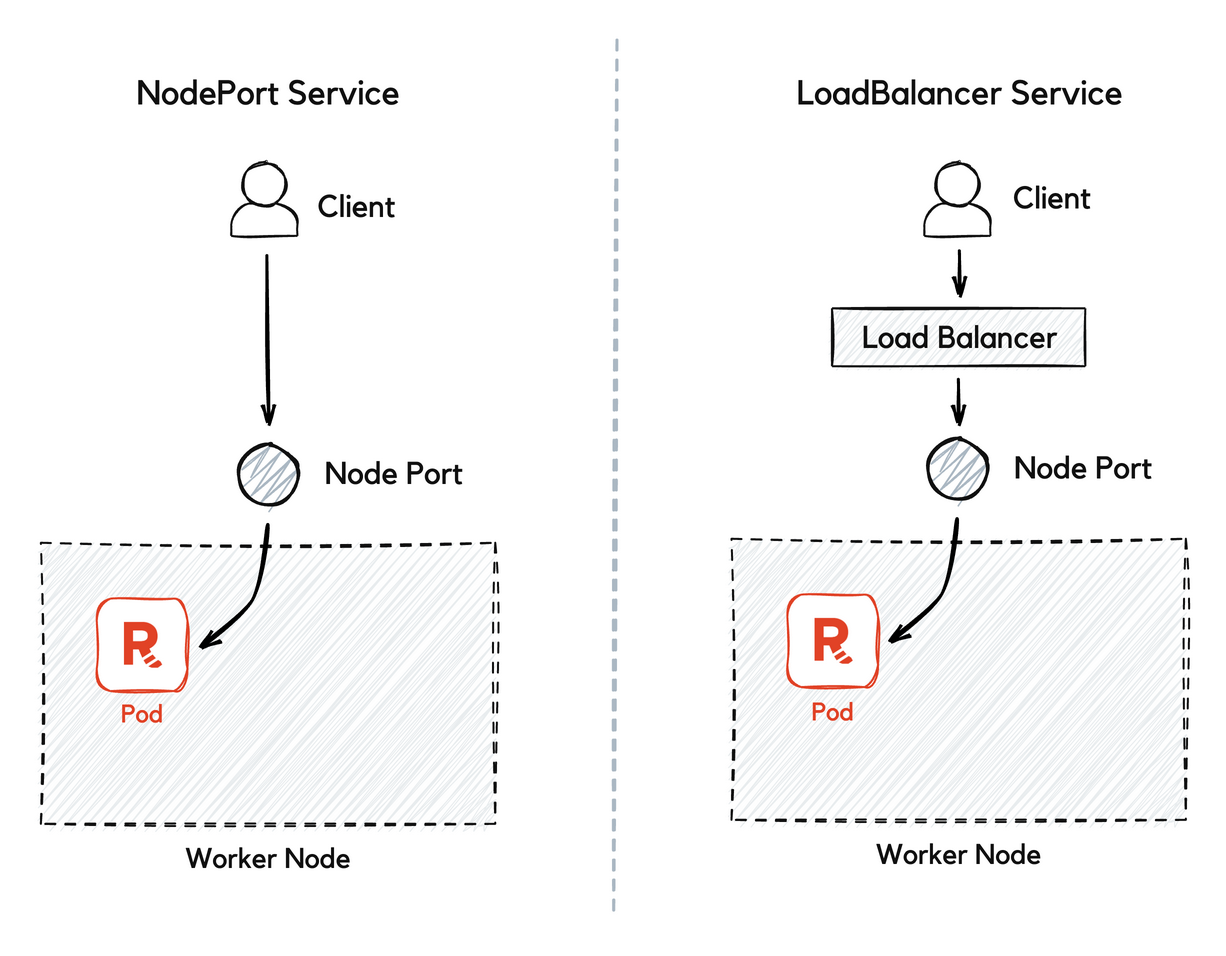
| To make each Redpanda broker addressable through a Service, each Redpanda broker should run on its own worker node. This way, clients or load balancers can use the address of the worker nodes to connect to specific Redpanda brokers. |
NodePort Service
When you use a NodePort Service, each worker node that runs a Redpanda broker is allocated a port for each listener. All traffic to these ports is routed through the NodePort Service directly to the worker node’s local Pod that runs the Redpanda broker. Clients then connect to the addresses of the worker nodes.
The NodePort Service has its service.spec.externalTrafficPolicy configuration set to Local so that clients can send a request to a specific worker node and it will go to the local Redpanda broker on the node. For details, see Traffic policies in the Kubernetes documentation.
|
LoadBalancer Service
When you use LoadBalancer Services, each Redpanda broker needs its own LoadBalancer Service so that clients can address each broker individually. Behind each LoadBalancer Service, you need a load balancer instance that is hosted outside your Kubernetes cluster to forward traffic to the worker node. Clients then connect to the addresses of the load balancer instances.
Using LoadBalancer Services is most useful on managed Kubernetes services because in these environments, the service provider usually creates the associated load balancer instances for you automatically. In bare-metal environments, you need to create the load balancer instances manually.
| Load balancers are slower than the NodePort Service. Load balancers force client traffic to make more network hops as the requests must go through the load balancer to get to the worker node, and then the LoadBalancer Service must forward the request to the local Pod. Load balancers are also expensive, so using a load balancer adds to the cost of running a cluster. |
